Latest Post

We now know what happens when you smash a point-and-shoot camera and an Android smartphone together: you get the Galaxy S4 Zoom. Last year, Samsung released the Galaxy Cam (read our review), a nice point-and-shoot camera with a full Android phone interface built into it. The problem was that it didn't have voice capabilities. Fast-forward a year, and wah lah, now you can buy the Galaxy S4 Zoom, a full-fledged, fully featured Galaxy phone with a 10x point-and-shoot on its back. But now that we have what we wished for last year, do we really want it? We're not so sure …

Editor's note: Mobile editor Jeff Van Camp evaluated the phone functions of this device while photography editor Les Shu evaluated the camera, camera interface and ease of transferring photos.

Uncomfortable to hold as a phone and camera

If you're considering buying a Galaxy S4 Zoom, there's no way you're doing it because you want a good-looking phone. The Zoom doesn't look large if you look at it from behind. It's 4.3-inch screen is downright small by today's standards, and it could be mistaken for the petite Galaxy S4 Mini. Give it a turn though, and you'll see that it packs a hefty bag of junk in its trunk. At its thinnest, it's 15.4mm or .6 inches, but its large zoom lens about doubles that thickness on the top and another bulge on the bottom comes close to matching it. It's thick by point-and-shoot camera and phone standards. In other words, it's just thick … really thick.

As a phone: We've lived through the days of Nokia N80 phones and Palm Treos, so we're okay with a little heft if it's for a good cause, but the S4 Zoom is not comfortable to hold. At first, the lens in the back felt a lot like the Nokia Lumia 1020's big 41-megapixel sensor, but it quickly proved far more annoying. While we could feel the 1020's camera on our hand when we made calls or held it, it was just a small change in feel that we had to get used to. Holding the S4 Zoom is like holding two iPhones stacked on each other and taping a couple cookies exactly where your palm is supposed to grip it. You can get used to it, but you'll never forget that you're talking to people with a camera.

You can get used to holding the Zoom, but you'll never forget that you're talking to people with a camera.

Texting and browsing the Zoom with two hands also takes a lot of getting used to as well. As if you're holding an uncomfortably small video game controller, your fingers must rest underneath the zoom lens wheel to operate the phone and type. It's do-able, but not fun. Operating the screen with one hand is more strained than it should be on a 4.3-inch device.

The lens does more than get in the way. It's a hazard. We continually tried to avoid gunking up the lens with our fingerprints, but if your finger accidentally moves the zoom wheel, the camera mode switching software will start up automatically. It took us a while to realize how this was happening.

As a camera: Using the S4 Zoom as a camera is equally frustrating. It's obvious that Samsung tried to keep the device as slender as it could, but unfortunately the side grip is too small to hold comfortably – unless you're a small child. The shutter button's location is too far to the right for your index finger to reach and press down on it while you're holding the camera. We also don't like the smooth plastic material. We found it to be slippery and difficult to hold onto (some textured surface areas would have been nice), and it almost fell out of our hands a few times – you'll definitely want to use a wrist-strap with this.

Finally, the plug for the tripod mount will eventually pop out and get lost. It only stays in by pressure.

Samsung-Galaxy-S4-Zoom-lens-macro

Battery and MicroSD Card: Camera folk will be disappointed that the Zoom doesn't take full-size SD cards and that it doesn't come with an external battery charger, but for phones, having a MicroSD card and removable battery are luxuries. Your happiness will depend on which camp you fall into.

As a phone, its interface is slow, but decent

We have few qualms with Samsung's Android 4.2 interface, which looks the same on most devices, from the Galaxy Note 3 to the Galaxy S4 to the Zoom. It looks elegant enough and it's close enough to standard Android that most things work well. The problem is that Samsung doesn't know how to say no.

The phone works decently, but does hiccup and slow down, even on the home screen.

The S4 Zoom comes with 67 apps pre-installed out of the box, taking up about 4GB of the device's 16GB of internal storage and clogging up 4 full pages of the app list. Some of these apps (especially the Google ones) are great, but we'd like to know why WildTangent Games is a necessary, undeletable app. We recommend disabling most apps on the phone if you buy it.

App volume aside, the phone works decently, but does hiccup and slow down, even on the home screen. This is because it is only running a 1.5GHz dual-core processor with 1.5GB of RAM. In our Quadrant benchmarking test, it scored a 3,333, or far lower than the Galaxy S3, a mid 2012 phone. On GeekBench 3, it scored a 392 on the single-core test and 685 for the multi-core test, with results about on par with the underpowered first iPad Mini. The screen packs a few less pixels than we'd like, with a 960 x 540 pixel resolution, or less than 720p, which is a baseline for mid-range phones in late 2013. We were surprised that the device held up when playing Modern Combat 3, but it did jitter during big moments of action.

Still, if you can put up with a few fumbles and some slow animations and occasional pauses, the Galaxy S4 Zoom is a decent lower-end to mid-range smartphone.

As a camera, it's interface can be frustrating

The reasons why smartphones have become so popular for casual photography are speed and convenience, so it's ironic that the camera in the S4 Zoom isn't easily accessible. There's no way to enter camera mode from the lock screen – pressing the shutter button or turning the zoom ring (located around the lens) won't do anything. Instead you'll have to unlock your phone and then go into the camera app, turn the zoom ring, or push the shutter button to activate the camera. Regular cameras are ready-to-go when you push the power button, so it's slightly annoying that we couldn't do the same with the S4 Zoom.

Aside from the Samsung camera app, one appealing feature about having the stronger zoom lens and image sensor is the ability to use them directly with other apps. So it was disappointing when we discovered that not all apps could utilize the full functionality of the camera. For example, you can shoot a photo in Instagram as you normally would with the app on any smartphone, but you can't zoom nor can you access the manual settings – and if you try to use the wheel to zoom, it will kick you out of Instagram completely. But with Flickr we had full access to the camera.

We kept unintentionally turning the ring when we're holding the S4 Zoom as a phone, pushing us into the camera Quick Launch menu when we didn't want to.

You can enter the camera mode by pressing the shutter button, turning the zoom ring, or entering the camera app after you unlock. When you twist the zoom ring, the Quick Launch and Shortcut menu appears, allowing you to go into a variety shooting modes directly.

But as Jeff described earlier, we kept unintentionally turning the ring when we're holding the S4 Zoom as a phone, so we kept going into the camera Quick Launch menu when we didn't want to. The only time this didn't turn into a nightmare was when we accidentally did it while on a phone call. If you're talking on the phone, it will let you take and send a photo to the receiver without hanging up. We couldn't see the usefulness of this feature, but the ability to do so is there should you need it.

If you're a fully automatic user, which most people are, then you should be fine using the camera – just half-press the shutter to focus and shoot the photo; the S4 Zoom is designed to mimic a basic point-and-shoot, so approach it as such when you're in camera mode. The one thing that might seem unfamiliar is the user interface, but it's fairly straightforward to use and pop-up dialogue boxes appear that help guide you if needed.

The S4 Zoom uses the same camera interface and navigation introduced in Samsung's Galaxy Camera, which the company has also rolled out to many of its newer standalone digital cameras. There are also several scene modes that let you choose a preset shooting mode based on the lighting condition, as well as quirky creative effects like making animated GIFs and "beauty face" (where skin tones are smoothed out for nicer complexion).

To zoom in and out, simply twist the zoom ring or press the zoom buttons on the screen, although the zoom process could be faster. But if you like to adjust the settings, like exposure compensation, aperture (although there's only two to choose from), shutter speed, etc., the camera has manual and semi-manual modes, too. These are useful for adjusting the brightness to your liking, for example. The one issue we found is that the menus aren't as responsive as we'd like sometimes when we're changing settings.

Overall, the S4 Zoom acts more like a traditional point-and-shoot when you're in camera mode, rather than a smartphone. The major difference is that you have the ability to upload and share your photos much easier than a PAS.

Photo quality doesn't greatly exceed the iPhone

The S4 Zoom is a marriage of phone and camera, and the idea is that it'd offer better image quality than a standard smartphone, which uses a smaller sensor and lacks an optical zoom. The S4 Zoom has a 16-megapixel backlit CMOS sensor that measures 1/2.3 inches, which is comparable to most budget point-and-shoot cameras and larger than sensors found in smartphones, including the iPhone.

Compared to Nokia's Lumia 1020's 41-megapixel 1/1.5-inch sensor, however, the S4 Zoom's is much smaller, but the S4 trumpets its 10x wide-angle optical zoom lens with image stabilization (although Nokia says you can crop into a 41-megapixel image to get a zoomed-in photo). So, the question now, then, is it really better than regular smartphone optics?

We shot some photos alongside an iPhone 5S, both in standard shooting mode. In comparison, the S4 Zoom's colors of the Manhattan skyline were duller and noisier than the 5S's, which were deeper and brighter. When viewed in full size, the buildings in the S4's images showed slightly better details, while the 5S had more distorted artifacts. But, at smaller sizes for sharing purposes, we think both images are absolutely fine, although we actually prefer the images from the 5S more – the 5S image's saturation was closer in intensity to how our eyes saw it, while the S4′s image quality was how the camera wants to see it. When it comes to the zoom, the S4 clearly has the advantage. Although the S4's optically zoomed-in image was noisy and blurry, it didn't lose as many details as the 5S did with its digital zoom. On that note, all the images we took at full zoom weren't as sharp as we would like. (You'll also notice, in the images above, that the S4 Zoom gives you a wider shot, thanks to the wide-angle lens.)

Samsung touts the backlit-illuminated CMOS sensor as capable of performing in low light, but in a shot of Lower Manhattan at sunset, the image from our 5S was less noisy and sharper. The S4's advantage was that we could adjust the exposure compensation to brighten the image. Although it blew out the sky in the background, it brought out the buildings in the forefront – useable in small sizes, but we wouldn't want to print it.

At the end of the day, the S4 Zoom's image quality is comparable to that of a basic point-and-shoot. The images are perfectly fine for casual use and for uploading to social media, but to say it outperforms other smartphones is a bold claim. In truth, we prefer the images we shot with the iPhone 5S over the S4 Zoom, and we thought the iPhone 5S was far easier to use, despite the S4 Zoom's camera-like qualities.

Transferring photos

Unless you're saving the images to the MicroSD card (and have an SD converter), transferring images can be a chore. We connected the S4 Zoom to a MacBook Air, and we couldn't get the camera to mount without installing Android File Transfer to get our Mac to recognize it as an external drive. You can upload files via apps and other online services, but those used to a dedicated camera may wish the file transfer process were smoother.

Call quality and battery life are solid

We tested the Galaxy S4 Zoom's call quality against the iPhone 5S and an HTC One and it performed on par in our area. We encountered some background noise and choppiness at the beginning and end of statements on both Verizon and AT&T, but we attribute this to our area.

Samsung Galaxy S4 Zoom angled left

Battery life on the S4 Zoom is about average for a smartphone these days. The 2330mAh battery was able to last us a full day except for the day we took an extremely large number of pictures. We recommend that budding photographers (and if you're buying this phone, you had best be) carry a backup battery.

Conclusion

There will be a group of people that really like the Galaxy S4 Zoom, cling to it, and defend it rigorously. It will have a cult following. But like the Galaxy Cam, it's kind of a strange tweener product. It's too bulky and slow to be a great Android phone, but too restrained in image quality and optics to be a fantastic professional camera. At $100 with a two-year AT&T contract or $550 alone, it's not super expensive for a high-end smartphone, but it costs hundreds more than a comparable point-and-shoot.

So, you could spend $550 on this uncomfortable merger of phone and camera, or you could pay $230 for a Canon PowerShot ELPH 110 HS, $180 for a Motorola Moto G, and $1.70 for a roll of Scotch Tape. The PowerShot is a better PAS than the Zoom, and the Moto G is a more powerful phone. So for $411.70, plus tax, you can buy yourself a nicer camera phone. Splurge $350 on the Nexus 5 and you're in for a treat.

Highs

  • Very cool idea
  • Only phone with 10x optical zoom
  • MicroSD card support

Lows

  • Uncomfortable to hold, and bulky
  • Zoom wheel will annoy you
  • Weak processing power
  • Camera zoom doesn't work with all apps
  • Photos didn't look better than iPhone 5S
  • No full SD support
  • No external battery charging

Lenovo has often talked about spreading its smartphone wings out into the wider world, and while it has moved out of China it hasn't succeeded in making the jump to the U.S. or Europe. Not that it's been slacking because of this. In the meantime it has amassed a significant enough market share to make it the world's third largest smartphone manufacturer. However, up until now, it has never produced a phone which we really wanted. This changed at CES 2014, where we got the chance to play with the recently announced Vibe Z. And Lenovo, if you're reading, we'd quite like this one to go on sale in the West. Please?

Unfortunately, despite some rumors to the contrary, Lenovo had nothing to announce about a Vibe Z U.S. or European release. It's not for want of trying apparently, as a Lenovo spokesperson told us the problem was trying to reach some kind of compromise with the all-controlling networks. So, now you know you can't have it, we best tell you why that's a bad thing.

First off, it looks great. It comes in two shades, gunmetal grey and titanium black, the latter of which looks best and really sets off the chrome base of the device. To give the polycarbonate rear panel a different look, a laser-etched pattern has been applied. In reality, this isn't as amazing as it sounds, but it does give the surface plenty of grip and adds some character missing from smooth polycarbonate panels.

Lenovo Vibe Z hands on ces 2014 screen 2

Flip the phone over and you're met with a 5.5-inch, 1080p resolution display, which shows Android 4.3. It's more heavily skinned than we'd like, and does away with the app drawer so we're left with pages of icons to stare at, just like iOS. To make up for it, Lenovo has added in a selection of bonus features. Our favorites focus (sorry) on the camera, particularly the lens above the screen. While Huawei's Ascend Mate 2 can safely be crowned king of the selfies at CES 2014, the Vibe Z comes a very close second.

The front camera has 5-megapixels and an 84-degree wide angle, therefore it doesn't need the panoramic mode seen on the Mate 2 to fit your mates into the shot. Lenovo wants you all looking your best, and has added a "Beautify" feature which automatically tweaks the picture for the best results. If that's not enough, an editing tool can give you a tan, widen your eyes, or even shave off a few pounds. It works well enough that's we'll never look at a selfie in the same way again.

Lenovo knows the Vibe Z's a big phone, and we liked the adjustments made to the onscreen keypad to enable one-hand use. Tilt it one way and the keyboard shifts over, so your thumb can reach the furthest away keys. A lift-to-answer gesture means you don't have to try and awkwardly mess about with buttons or sliders when you just want to talk. To leave us well and truly teased, the Vibe Z is also Lenovo's first smartphone with 4G LTE connectivity.

It's not perfect though, and the decision not to put the sleep/wake key on the side of the phone where it belongs, but instead on top is very frustrating. It was made worse by its final position, which made finding it by touch frustratingly difficult.

However, by far the worst thing about the Vibe Z is that we can't pop out and buy one. Those in Lenovo's major markets such as Indonesia, Saudi Arabia, and the Philippines will see the Vibe Z in February, but the rest of us must wait until the legal and contractual wrangling between Lenovo and the networks has been worked out. For the first time, we're really rooting for the suits to sort something out very soon, as the Vibe Z is good enough to ruffle some feathers.

Highs

  • Good looking and well made.
  • Cool photo software features
  • Impressive 5-megapixel front camera
  • 4G LTE connectivity and a Snapdragon 800 processor

Lows

  • Awkward power button placement
  • Android has been heavily skinned
  • We can't buy one

gmail

Recently, Google rolled out an update that allows Gmail users to save attachments from their emails directly to Google Drive, Google's cloud storage service. Prior to the update, people who wanted to upload stuff to their Google Drive account from their Gmail inbox had to first download the attachments, save them to their machines, and then upload them to Google Drive manually. Not anymore.

So how do you pull this off? It's pretty simple. Well show you how. 

How to save an attachment straight to Google Drive

First, open an email in your Gmail account that contains an attachment. From there, put your mouse pointer directly over the preview image of the attachment you want to save to Google Drive, which should be located towards the end of the email near where you'd type up a reply. By putting your mouse pointer over the preview image, Gmail gives you two options to choose from, in the form of buttons.

By clicking on the button on the left, you'll simply download the attachment to your computer. However, the button on the right, whose icon sort of resembles the universal symbol for recycling,  is the button that'll allow you to save that attachment directly to Google Drive.  Click on it, and it'll do just that.

Depending on the size of the file, that attachment will soon be saved to your Google Drive account. To find it, just open your Google Drive account and search for the attachment by using the search box at the top of the screen. You can also find it manually, though we don't recommend that you do so if your Google Drive account has tons of files in it.


If you routinely participate in group calls on Skype with friends, co-workers, and/or family, you know how frustrating it can be to have to rely on audio and hope that everyone pays attention and stays on the same page. Fortunately, if you're a Windows, Mac, or Xbox One-based Skype user, these frustrations are now a thing of the past. Microsoft announced that group video calls would be free for users of these three platforms starting today.

Though you may not be familiar with the feature if you've never been subscribed to the Premium version of Skype, luckily, it's easy to pull off a group video call. We'll show you how below.

How to make a Skype group video call for free

1. Once Skype is open, select one of the people that you want to add to a group call.

skype how to 1

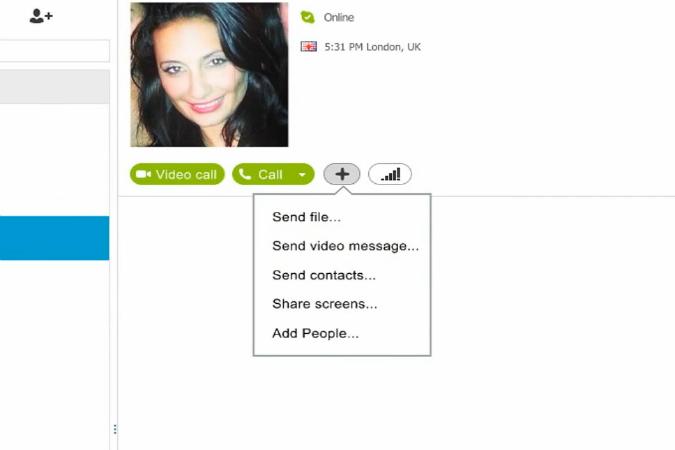
 2. Then, click the + or Plus menu to the right of your friend's list, and click "Add People…."

skype how to 2

3. From there, a new window will open up, allowing you to choose the other people that you want to include on this call. Click the people you want to add under the list labeled "Choose contacts," then click "Select" to add them. 

skype how to 3

In order to remove anyone from the call, select them from the list labeled "People in this group" located on the right side of the window, and click "Remove" below. You can also add someone to the call by typing in their phone number in the field below the "Select" button that's under "Choose contacts." Once you're done, click "Add" on the bottom right corner of the window.

4. Now, all you need to do is hit "Video call," which is located between the top of your Contacts list and the "Call Group" button.

skype how to 4

From here, it'll be up to the people in your group to pick up once they get the call on their end.

Alternatively, you can check out the clip below, which also demonstrates how to make group video calls in Skype. The clip is courtesy of Microsoft and YouTube.

Imran Khaliq, 12, helped his brother Farhan, 7, left, and Aidan Brown, 6, at a school computer coding event in Mill Valley, Calif.

MILL VALLEY, Calif. — Seven-year-old Jordan Lisle, a second grader, joined his family at a packed after-hours school event last month aimed at inspiring a new interest: computer programming.

"I'm a little afraid he's falling behind," his mother, Wendy Lisle, said, explaining why they had signed up for the class at Strawberry Point Elementary School.

The event was part of a national educational movement in computer coding instruction that is growing at Internet speeds. Since December, 20,000 teachers from kindergarten through 12th grade have introduced coding lessons, according to Code.org, a group backed by the tech industry that offers free curriculums. In addition, some 30 school districts, including New York City and Chicago, have agreed to add coding classes in the fall, mainly in high schools but in lower grades, too. And policy makers in nine states have begun awarding the same credits for computer science classes that they do for basic math and science courses, rather than treating them as electives.

There are after-school events, too, like the one in Mill Valley, where 70 parents and 90 children, from kindergartners to fifth graders, huddled over computers solving animated puzzles to learn the basics of computer logic.

It is a stark change for computer science, which for decades was treated like a stepchild, equated with trade classes like wood shop. But smartphones and apps are ubiquitous now, and engineering careers are hot. To many parents — particularly ones here in the heart of the technology corridor — coding looks less like an extracurricular activity and more like a basic life skill, one that might someday lead to a great job or even instant riches.

The spread of coding instruction, while still nascent, is "unprecedented — there's never been a move this fast in education," said Elliot Soloway, a professor of education and computer science at the University of Michigan. He sees it as very positive, potentially inspiring students to develop a new passion, perhaps the way that teaching frog dissection may inspire future surgeons and biologists.

But the momentum for early coding comes with caveats, too. It is not clear that teaching basic computer science in grade school will beget future jobs or foster broader creativity and logical thinking, as some champions of the movement are projecting. And particularly for younger children, Dr. Soloway said, the activity is more like a video game — better than simulated gunplay, but not likely to impart actual programming skills.

Some educators worry about the industry's heavy role: Major tech companies and their founders, including Bill Gates and Facebook's Mark Zuckerberg, have put up about $10 million for Code.org. The organization pays to train high school teachers to offer more advanced curriculums, and, for younger students, it has developed a coding curriculum that marries basic instruction with video games involving Angry Birds and hungry zombies.

The lessons do not involve traditional computer language. Rather, they use simple word commands — like "move forward" or "turn right" — that children can click on and move around to, say, direct an Angry Bird to capture a pig.

Across the country, districts are signing up piecemeal. Chicago's public school system hopes to have computer science as a graduation requirement at all of its 187 high schools in five years, and to have the instruction in 25 percent of other schools. New York City public schools are training 60 teachers for classes this fall in 40 high schools, in part to prepare students for college.

"There's a big demand for these skills in both the tech sector and across all sectors," said Britt Neuhaus, the director of special projects at the office of innovation for New York City schools. The city plans to expand the training for 2015 and is considering moving it into middle schools.

The movement comes with no shortage of "we're changing the world" marketing fervor from Silicon Valley. "This is strategically significant for the economy of the United States," said John Pearce, a technology entrepreneur. He and another entrepreneur, Jeff Leane, have started a nonprofit, MV Gate, to bring youth and family coding courses developed by Code.org to Mill Valley, an affluent suburb across the Golden Gate Bridge from San Francisco.

Parents love the idea of giving children something to do with computers that they see as productive, Mr. Pearce said. "We have any number of parents who say, 'I can't take my kid playing one more hour of video games,' " he said. But if the children are exploring coding, the parents tell him, " 'I can live with that all night long.' "

The concept has caught on with James Meezan, a second grader. He attended one of the first "Hour of Code" events sponsored by MV Gate in December with his mother, Karen Meezan, the local PTA president and a former tech-industry executive who now runs a real estate company. She is among the enthusiastic supporters of the coding courses, along with several local principals.

Her son, she said, does well in school but had not quite found his special interest and was "not the fastest runner on the playground." But he loves programming and spends at least an hour a week at CodeKids, after-school programs organized by MV Gate and held at three of Mill Valley's five elementary schools.

James, 8, explained that programming is "getting the computer to do something by itself." It is fun, he said, and, besides, if he gets good, he might be able to do stuff like get a computer to turn on when it has suddenly died. His mother said he had found his niche; when it comes to programming, "he is the fastest runner."

Other youngsters seemed more bewildered, at least at first. "The Google guys might've been coders, and the Facebook guys — I don't know," said Sammy Smith, a vibrant 10-year-old girl, when she arrived at the coding event at Strawberry Point.

But well into the session, she and her fifth-grade friends were digging in, moving basic command blocks to get the Angry Bird to its prey, and then playing with slightly more complex commands like "repeat" and learning about "if-then" statements, an elemental coding concept. The crowd had plenty of high-tech parents, including Scott Wong, director of engineering at Twitter. His 7-year-old son, Taeden, seemed alternately transfixed and confused by the puzzles on the laptop, while his 5-year-old brother, Sai, sat next to him, fidgeting.

The use of these word-command blocks to simplify coding logic stems largely from the work of the Massachusetts Institute of Technology Media Lab, which introduced a visual programming language called Scratch in 2007. It claims a following of millions of users, but mostly outside the schools.

Then, in 2013, came Code.org, which borrowed basic Scratch ideas and aimed to spread the concept among schools and policy makers. Computer programming should be taught in every school, said Hadi Partovi, the founder of Code.org and a former executive at Microsoft. He called it as essential as "learning about gravity or molecules, electricity or photosynthesis."

Among the 20,000 teachers who Code.org says have signed on is Alana Aaron, a fifth-grade math and science teacher in the Washington Heights neighborhood of Manhattan. She heard about the idea late last year at a professional development meeting and, with her principal's permission, swapped a two-month earth sciences lesson she was going to teach on land masses for the Code.org curriculum.

"Computer science is big right now — in our country, the world," she said. "If my kids aren't exposed to things like that, they could miss out on potential opportunities and careers."


A still from Kochadaiiyaan

New Delhi: At last the long wait is over and Rajinikanth fans across the globe will get to see his much-awaited and anticipated Tamil film Kochadaiiyaan, directed by the matinee idol's younger daughter Soundarya. When it unravels on the silver screen on Friday, the film will introduce moviegoers to a new technology - first motion capture photo-realistic 3D animation. 

A labour of love, Soundarya's Rs 125-crore venture, which has been cleared with U-certificate, will have a wider release - it will release in 10 countries on approximately 6,000 screens and will be dubbed in six languages, including Telugu, Hindi and more likely in Bhojpuri too.

Jointly produced by Media One Global Entertainment and Eros International, the film has been dubbed in Spanish and Japanese too.

It took Soundarya two years, over 200 technicians in India and abroad to make the film, which was tagged as a "delayed project" by many. But the 29-year-old tech-savvy director, who keeps herself abreast with the latest technology, said there wasn't any delay, "It is the process that takes such a long time to make a film like this."

It's Soundarya's tribute to her father's illustrious career.

Soundarya completed the film "braving all technological odds" and hopes thatKochadaiiyaan breaks the myth that the animation film is cartoon, and is accepted as an alternate filmmaking medium.

Comparisons with Hollywood films Avatar, made with the same technology, are inevitable, but the makers are unperturbed because they feel looking at the budget and time, comparingKochadaiiyaan with these films is not practical.

The makers explained that Avatar was made on a budget of Rs 3,000 crores and was completed in five years, while Tin Tin cost about Rs 4,000 crore and also took about five years.

In the film, Rajinikanth, 63, has been paired with 28-year-old Bollywood actress Deepika Padukone, who also has elaborate stunts in the film.

According to Soundarya, her father felt awkward shooting romantic scenes with Deepika. 

"I guess it was because I was around and calling action and cut, dad felt very awkward to shoot some romantic scenes," said Soundarya.

Deepika's stunts are described as never-before-seen action by a female star from any part of the world and said to be on par with Uma Thurman's Kill Bill and Angelina Jolie'sLara Croft.

There is a ten-minute stunt in the film, which has been choreographed by Peter Hein, the man behind Rajinikanth's stunts in Robot. Apparently, the superstar personally requested Hein to make Deepika's action sequences "super-hero style".

Soundarya feels Deepika's stunts are one of the highlights of the movie.

One of the biggest Tamil stars, Rajinikanth, who is technologically not as sound as his daughter, gives credit to god for being able to do Kochadaiiyaan.

He also marvels at his daughter's passion and understanding for the technology. "I am amazed, Soundarya, in her childhood, had this obsession. She liked to read books with pictures and my wife identified her talent and encouraged her. I am proud of her with all the legends praising my daughter. I hope people like the film."

Even her mother Latha is proud of her.

Double Oscar-winning composer AR Rahman's music is another high point of the film, but the maestro was not confident about working in Kochadaiiyaan.

Though the film is yet to release, Soundarya has already been honoured with the NDTV Indian of the Year Technical Innovation in a Film award.

All eyes are set at the box office and how the audience receives Kochadaiiyaan, especially Rajini fans, who in the past turned his The Boss and Robot into humongous successes.

Kachori is a popular, spicy Indian snack. Flour roundels stuffed with coriander leaves, chillies, pudina and spices. Fried crisp and golden!
Ingredients

2 cups maida

2 tsp salt or to taste

2 Tbsp ghee or oil

2 Tbsp curd

1 cup besan

1 Tbsp mint leaves- chopped

1 Tbsp hara dhania - chopped

1/2 tsp chilli powder

1 tsp ginger-garlic paste

1 tsp green chilli paste

1/2 tsp haldi powder

1/2 tsp garam masala

 1 Tbsp lemon juice or to taste oil

Method
Mix maida with 1 tsp salt, ghee and curd and knead to a stiff dough. Use some more curd if needed.

In a saucepan heat 2 Tbsp oil and add ginger-garlic paste, haldi, green chilli paste, pudina, coriander leaves, garam masala, salt to taste and besan. 

Saute till all the liquid evaporates and the mixture collects together and fat separates.

Take the pan off the heat add lemon juice and mix well. Then keep aside to cool.

 Break balls of dough to a desired size. Roll each ball into a round and then a flat disk about 1/8 inch thick.

 Pinch the edges, wet a bit and place some of the besan mixture in the center.

Cover the mixture and pinch the dough to seal.  Smoothed it into a proper round and keep aside till ready to fry. 

To fry, heat the oil, and add the balls, lower the heat and fry till light brown. Serve hot.

Juicy patties made with lamb mince, freshly made tomato sauce and loads of herbs.
Ingredients

1 medium onion chopped to a paste

1 1/2 tsp garlic paste

Salt to taste

Freshly ground pepper

25 gm butter

1/2 tsp oregano (optional) 

1/2 kg skinned, de-seeded & chopped tomatoes

2 Tbsp fresh, soft bread crumbs

125 ml milk

2 Tbsp softened butter

4 Tbsp chopped parsley / coriander

2 finely chopped, deseeded green chillies (Optional)

1 egg

1/2 kg lean minced meat (Keema)


To coat:

Seasoned flour

1 tsp oil

1 Tbsp butter

Method
For the tomato sauce:

Melt 25 gm butter.  Add onion paste & cook for 5 minutes. 

Add garlic paste & continue cooking for 2 minutes more. Season well. 

Add oregano & prepared tomatoes. Simmer until well reduced & very thick.  Set aside to cool.  


For the patties:

Soak breadcrumbs in milk for 10 minutes.  Squeeze out excess milk & add breadcrumbs to tomato mixture. 

Mix raw mince with softened butter, herbs, egg & chillies. Add tomato mixture & beat well for 5 minutes. 

Form 6-12 patties with mince.  Refrigerate for 20 minutes.  Mix flour, salt & pepper. 

Coat each burger in seasoned flour.  Heat 1 tsp oil. Saute each burger for 5 minutes on each side. 

Place cooked patties in the centre of split, buttered buns and serve with sauces of your choice.

Ditch the boring bag of potato chips and go for these homemade crispy munchies, that are much healthier. You can bake or fry them!
Ingredients

500 gm potatoes- peeled

1 Tbsp salt

Method
Slice the potatoes, very thin, using a slicer, so that the slices are even. 

Heat water, in a large container, large enough to take in the sliced potatoes. 

Add the salt and when the water comes to a boil, add the potatoes, keeping the heat high.

When it comes to a boil again, drain the water and dry the potatoes in the sun till they turn crisp.

Store in airtight containers and bake or fry them when needed. 

Technology is all about making our lives easier, except when it isn't

Technology, it's an intrinsic part of your life. It lets you announce how hungover you are then share a customary Sunday roast Instagram finally finished off with a long and hideously detailed phone call with a friend about how everything was 'off the hook' last night.

Of course you'll never be able to do all three though, because that's technology at its core - fantastically useful and 100 per cent never capable of working just when you need it to. Don't believe us? Here are 10 tech battles where ultimately you will never be the victor...

1. Making your smartphone stay silent

You can turn the volume down using the little side buttons. You can go to Settings and turn audio off completely. You can then turn your phone off, dismantle it and put the parts in a suitcase and throw it in the sea. But come your next big meeting, funeral or intimate clinch you'll still hear "BEEP-BOP! BEEP-BOP!" to tell you there's a new Easter-themed version of Angry Clans available.  

2. Remembering your set-top pin

Go on, tell us what it is without looking at the card stuffed inside? After a couple of failed attempts you're on the brink of being locked out of your telly, forcing you to shut everything down and yank the card out frantically. Yep, you've now missed the 9pm box-office slot… popcorn back in the cupboard.

3. Using mobile data in the countryside

With no wi-fi nor 3G available, you're forced to deal with E, the lame horse of the downloading world or, worse, GPRS, the dead horse. Simply posting a tweet means holding your phone deathly still in one hand, like it's a sleeping baby filled with plutonium, while you will it to function. After twenty minutes you're told it hasn't worked and will, of course, immediately try again. You could have written the tweet on a Post-it note and cycled around the UK showing it to people in less time.

4. Getting voice control to work

Never more hard-fought than when trying to showcase your new phone or games console to your parents. Go on, Mum, ask it anything, you prompt. "What time shall we have tea?" No, I mean, ask it something else. "What's the song in that advert about bread?' No, you have to ask it something that you could more quickly and easily find out yourself, like the current time. "Okay, what time is it?" No, you have to press it again… look, just forget it.

5. Finding a spare memory card

Put it anywhere other than inside your camera and it's never seen again. You have a better chance of finding a specific pin in a stack of other pins while blindfolded and using only your mouth.

6. Cleaning living room tech

Just like you, household dust is addicted to the holy plastic-meets-metal trinity of stereos, televisions and set-top boxes. Trying to wipe it away is as pointless as digging upwards – as soon as you've put the cloth away the dust has doubled, like the crows in Hitchcock's The Birds.

7. Untangling headphones

If approached in a calm, methodical manner, we're sure it's possible, but, really, who does that? You thrash at them wildly, one-handed, before they annoy you so much that you tug a bit too hard and damage the cable. As a result, music only comes out of one ear cup, really capturing that sonic nostalgia of pressing your ear against the closed door of a gig after being physically removed. Happy days.

8. Opening a car window the desired amount

We're all for the iCar invasion, but electric windows still appear to have just two settings: "retract fully to unleash a hurricane through your motor" or closed. All other options see your passenger despairing as you repeatedly press buttons to find the sweet spot, before demanding that you do it up again because the field smells a little too fresh. By this point a wasp's flown in, the ensuing panic causing you to crash into said field.

9. Typing with one hand

After five failed attempts at inputting your still pathetically unsafe six-letter password, blood pressure reaching dangerous levels, it's time to admit defeat and put the sandwich down.

10. Re-boxing any gadget, ever

The tech equivalent of trying to get toothpaste back in the tube. Out of the box came the device, a plug and a slim paper booklet, so why is it that now you want to get it back in there for Mr Ebay there's a power brick the size of a microwave? Replacing polystyrene packaging is a task that reduces grown adults to tears of frustration faster than you can scream, "Get the crystal!"

The Olympus OM-D E-M10 is the brand's best priced OM-D yet

T3 rating:

4 stars

Like:

  • Decent price
  • Wi-Fi and tilting toucscreen
  • Stunning images

Dislike:

  • Viewfinder could be comfier
  • Smaller sensor than rivals

We've been blessed with premium grade interchangeable lens compacts of late that have blended pleasing form with excellent functionality – chiefly those from Fuji's 'X' series and Olympus' OM-D and Pen camera ranges.

The difference between the latter two options – OM-D and Pen – has chiefly been price and portability, but the latest OM-D in the 16 megapixel Micro Four Thirds system Olympus OM-D E-M10, reviewed here, is both the most compact OM-D to date and the most affordable too. Conceivably anyone who has been lusting after the high endOlympus E-P5, might also now want to take a look at the E-M10.

With its shrunken DSLR-like styling, the most obvious advantage here is an eye-level viewfinder, plus its maker has also found room for a tilting LCD screen at the back.

In its black and silver combination that we reviewed, the E-M10 doesn't unduly suffer in comparison with its pricier siblings in the weather proofed range-topping Olympus OM-D E-M1 and olderOM-D E-M5.  

The cover that protects the compartment housing both rechargeable battery and optional SD media card at the base of the E-M10 was the only element that seemed noticeably plastic-y or 'budget' feeling to us.

There's enough space to put your hands and the layout didn't feel as cramped as its predecessors. Altogether it feels a little less over-engineered than the E-M1 and E-M5, and, if you don't need the pro-level weather resistant body, the E-M10 is all the better for it in our opinion. And the body here is sturdy magnesium alloy anyway.

There is, however, some very strong competition on the market in the E-M10's category, not least from the Fujifilm X-A1 and Fujifilm X-E2, but also the Sony A5000 and Sony A6000, theSamsung NX300 and Samsung NX30, the new Nikon 1 V3, plus the impressivePanasonic Lumix DMC-GX7 and GM1.

The Olympus retails for a suggested £699.99 with the ultra compact 14-42mm zoom we had for review, which feels fair, said lens extending automatically when the camera is switched on, rather than having to be manually extended, as with earlier iterations of the same lens.

title: Olympus OM-D E-M10: Controls / url: Olympus-OM-D-E-M10-Controls

Olympus OM-D E-M10: Controls

In terms of controlling the 14-42mm lens supplied, barely a couple of centimetres in depth when retracted, unlike your average electronic zoom we were still able to zoom in or out by turning a ring on the lens barrel, rather than togging backwards and forwards via a zoom lever on the camera itself.

While the automatic nature of the lens made for smoother zooms when shooting video, we did find it slower to respond than a manual zoom when attempting to compose our photographs, when simply a quick flick of the wrist would have nigh instantly got us where we wanted to be.

But there's always the option to go for one of the 16 directly compatible Micro Four Thirds lenses including manual zooms. If you buy a lens adapter for the OM-D E-M10, choice is extended to around 60 lenses, including those for older Four Thirds system DSLRs and original film shooting OM cameras.

Atop the camera, giving it a rangefinder-like look, we get two unmarked control wheels, the foremost one encircling the raised shutter release button.

The one toward the rear can readily be operated by the thumb to scroll up and down through menu screen options, or alternatively enlarge a portion of an already captured image on screen with an anti-clockwise twist. A clockwise twist, does the opposite and instead displays previously captured images as a series of thumbnails.

Across the raised hump that houses both the eye level electronic viewfinder and pop-up flash, at the other end of the top plate we find a familiar bottle top style shooting mode wheel.

Here we get the regulars of Program, Aperture Priority, Shutter Priority and Manual modes, along with the failsafe of scene and subject recognising intelligent Auto (iAuto).

This being an Olympus camera, the mode wheel also has access to the built in digital effects, of which there are 13 options, including our favourite of the HDR image-like Dramatic Tone, alongside Pop Art, Pinhole camera and Diorama options.

A video mode is also present on the same dial. Though we were able to start and stop filming with a press of the dedicated red record button on the E-M10's top plate, this movie menu also allows colour saturation to be adjusted and short clips to be filmed in black and white.

title: Olympus OM-D E-M10: Screen, Battery / url: Olympus-OM-D-E-M10-Screen-Battery

Olympus OM-D E-M10: Screen

The adjustable 3-inch monitor on the back of the E-M10 is also a touch screen, although it's not immediately obvious as on-screen settings are so tiny we had to be quite precise with our finger taps.

As noted earlier there's also a traditional eye level viewfinder provided on the E-M10 - not a feature that we always find in this price bracket. It even comes with a built-in eye sensor, so as we move our attention from the large LCD to the smaller window above, it automatically activates for seamless operation. Remove an eye from the viewfinder the main LCD switches itself back on like magic.

It's also well worth giving praise to the resolution provided by the OM-D E-M10's viewfinder and LCD – the former housing a whopping 1.4 million dots and the latter 1.037. As a result the viewfinder doesn't feel pokey and blurry compared to the larger screen.

While the 3-inch LCD can be tilted up or down, it cannot be flipped completely so that it's facing the subject before the lens for selfies.

Nor can it be flipped outwards from the body so it is sitting alongside it, as with the screen on any camcorder and competing interchangeable lens cameras including Samsung's NX30. However Olympus would very likely argue that this would have added to the camera's bulk.

Olympus OM-D E-M10: Battery

The chunky BLS-5 battery that slots into the base of the OM-D E-M10's handgrip is charged via a standalone charger, rather than its manufacturer stinting on the basics and asking us to charge it within the camera body itself.

Battery life is good for around 320 shots from a full charge which is perfectly respectable for a camera in its class; yes Sony's previously reviewed A5000 may offer 420 captures from its own battery but this is the noted exception rather than the rule.

title: Olympus OM-D E-M10: Picture quality, Verdict / url: Olympus-OM-D-E-M10-Picture-quality-Verdict

Olympus OM-D E-M10: Picture quality


The E-M10 produced cracking pictures during the course of our testing period, with plenty of punch provided. If we wanted to add a bit of extra 'zing' then we merely reached for the Dramatic Tone option in the Art Filter mode, to provide a bit more contrast and depth to shots.

You would imagine that you were looking at pictures taken with an SLR rather than a compact, which makes the asking price worth paying, especially if you prefer a smaller overall form factor.

Yes, compact system cameras have long promised results similar or a match for DSLRs, but we only feel it's very recently that we've come across a couple of cameras – the other being the excellent Fujifilm X-T1, for which we can say that claim starts to ring true.

As noted earlier, it's when shooting video that the mechanical zoom supplied comes into its own, drifting smoothly through the shot avoiding any jerky movements that the less experienced videographer might add if making manual adjustments.

We'd prefer to use a manual zoom for stills, and the supplied lens for video if we had a choice, but there's no doubt that the bundle here makes for a tight, manageable package capable of some quite excellent results.

Olympus OM-D E-M10: Verdict

If, like us, you've hankered after the more 'classic' models in Olympus' contemporary OM-D range but baulked at the £1,000+ price tags, then the £699, 16 megapixel OM-D E-M10 and zoom lens combo is the answer to your prayers.

Not only does it look and feel great, but When it comes to image quality, the E-M10 doesn't disappoint, providing detailed, colour rich images.

Olympus OM-D E-M10 release date: Out now

Olympus OM-D E-M10 price: £699.99

S Naga Malleswara Reddy

S NAGA MALLESWARA REDDY

Contact Form

Name

Email *

Message *

Powered by Blogger.
Javascript DisablePlease Enable Javascript To See All Widget