May 2014


An Australian man is suing Twitter for defamation after he was wrongly named as the author of a hate blog, a report said Friday.
Text resize:

NEW YORK: If the Heartbleed security threat teaches us anything, it's that passwords don't offer total protection.

Browsers are supposed to keep passwords and other sensitive data safe, but a technical flaw in a widely used padlock security technology allows hackers to grab the information anyway. Even without this latest discovery, there have been countless disclosures of hackers breaking in to grab usernames and passwords, plus credit card numbers and more.

That's why many security experts recommend a second layer of authentication: typically in the form of a numeric code sent as a text message. If you're logging in to a website from your laptop, for example, you enter your password first. Then you type in the code you receive via text to verify that it's really you and not a hacker.

I've been using what's known as two-factor authentication or two-step verification on most of my accounts for more than a year, after seeing too many mysterious attempts to reset my Facebook password by someone who isn't me. The main exception was Gmail, but I enabled that recently after the discovery of Heartbleed. I was afraid the second authentication would be a pain to use, but things are going more smoothly than I expected after the initial setup.

The idea behind these double-layer passwords is to make it harder to use a password that's compromised or guessed. You're asked for a second piece of information that only you are supposed to know.

To balance security and convenience, you can typically bypass this check the next time you use the same Web browser or device. It won't help if someone steals your laptop, but it'll prevent others from using your password on their machines. If you're logging in at a library or other public computer, remember to reject the option to bypass that check next time.

The second piece of authentication could be your fingerprint or retina scan, though such biometric IDs are rarely used for consumer services. Financial services typically ask for a security question, such as the name of your childhood pet, the first time you use a particular Web browser or device. That's better than nothing, though answers can sometimes be guessed or looked up. Some banks offer verification codes by text messaging, too.

I like that approach and use it for a variety of email and social networking services. To me, email accounts are the most sensitive because email can be used to reset passwords elsewhere. That includes my banks and shopping sites.

The two-step requirement is fairly simple to turn on. With Google, for instance, it's under the Security tab in your account settings. On Facebook, look for Login Approvals under Security in the settings. With Apple IDs, visit appleid.apple.com rather than the account settings on iTunes.

After you enable it, you'll typically have to sign in to your account again on various Web browsers and devices. After entering your username and password, a code will get set to your phone. You'll have to enter that to finish signing in. This has occasionally meant getting off my couch to grab my phone from the charger, but that's a small price for security.

What if you're somewhere without cellular access and can't receive texts?

Most services have backup mechanisms. Google, Facebook and Microsoft have apps that will let you receive verification codes even when you're offline. Google and Facebook also let you generate 10 backup codes that you can download or print to keep in your wallet. Each can be used only once.

You can also turn off the two-step requirement temporarily if you'll be traveling without cellular access, though I don't recommend it. The reason I turned it on last year was because I was leaving the country and wouldn't be able to deal with further mysterious reset attempts.

Occasionally, you'll run into an app that won't accept the text code. Apple's Mail app on iPhones, iPads and Mac computers is one. Microsoft's Outlook software is another. If that happens, you'll have to go to your service's settings to generate a temporary password for that particular app. It's a pain, but I've rarely needed to do this.

There are several other challenges to making this work smoothly. For example, if you have a shared Twitter account, such as for your company or organization, two-step verification isn't very practical unless you also share your phone. There's a 12-character, hard-to-guess backup code you can use instead. But it's no security if you jot it down next to your main password.

The biggest problem, though, is losing your phone. Some services will let you provide a backup number, including a friend's cellphone or a landline phone. With Google, the code can be sent as a voice message instead of a text. Others offer a complex recovery code, which you'll have to jot down and keep in a safe place.

I know two-layer security is inconvenient. The first password is difficult enough to deal with. But think of the inconvenience involved should someone break into your account and shut you out. Consider the use of verification texts to be insurance.


The updates rolled out for Pages, Numbers, Keynote and iWork documents allows for an added layer of security to web sharing.

WASHINGTON: Apple recently updated its iWork office suite, allowing users to password protect specific documents for web sharing, however, despite iOS interface appearing a little tricky otherwise, adding password to iWork data is extremely simple. 

The updates rolled out for Pages, Numbers, Keynote and iWork documents allows for an added layer of security to web sharing. 

According to Cnet, to add a password to the iOS, iCloud or Mac version of the iWork app, a user open the respective document and tapping on the settings icon and select the 'Select Password'. 

One can also choose to make the iOS app or Mac device to remember the password, however, a password for one device is specific to that device and there is no syncing across platforms or iCloud connected devices. 

The report said that adding a password on OS X is a little different, as a user doesn't need to open the document, but instead click on File in the toolbar, followed by 'Set Password' option. 

User can also select the Share icon, then 'View Share Settings' and set a password by selecting 'Add Password' for OS X. 

The updated features allow users to share password-protected iWork documents using an iCloud.com link and any changes made to an iCloud -shared document will sync across all devices, the report added.


The new feature is not available via WhatsApp on Play Store as of now and you will have to do a bit of tweaking in Settings to get it.

WhatsApp has finally rolled out the feature to disable to the 'Last Seen' timestamp on Android smartphones. While this feature has been available for iPhones for long, Android users have got this option now only.

The new feature is not available via the WhatsApp app on Google Play Store as of now and you will have to do a bit of tweaking in Settings menu to get it. Here's how you can disable the 'Last Seen' timestamp on Android:

1. Make sure that your smartphone is running on Android 2.1 or a newer version

2. Head to the Settings menu and enable 'Download from Unknown Sources' in the Security tab

3. Go to the WhatsApp website and download the APK (application) file available under www.whatsapp.com/Android/

4. Once the APK file is downloaded to your device, tap on it. It will show two options - 'Package Installer' and 'Verify and Install'; select the first one

5. You will get a message saying that this application will make changes to WhatsApp; allow it to alter the app. All your WhatsApp data will be retained despite the changes

6. Now that WhatsApp has been updated, select Setting → Account → Privacy. You will see the 'Last Seen' option here, with three options - Everyone, My Contacts and Nobody. Select the one that suits you best

Remember, when you stop others from seeing your 'Last Seen' timestamp, you were not be able to see theirs either.

Under the Privacy menu, you will also see the options of restricting who can see your profile photo and status. This is a feature available only on WhatsApp and not on iPhones.

iPhone users who want to alter the 'Last Seen' settings can follow these simple steps:

1. Open WhatsApp and go to Chat Settings and select Advanced

2. Now turn toggle the 'Last Seen Timestamp' to 'Off'

Once you change the Last Seen status on WhatsApp for iPhones, you will not be able to alter it again for the next 24 hours. On the other hand, Android has no such restrictions and you can change the setting as many times as you want on the same day.


Microsoft made some useful improvements to Windows Explorer in Windows 8, but they also (inexplicably) took some things away. 
Text resize:
Microsoft made some useful improvements to Windows Explorer in Windows 8, but they also (inexplicably) took some things away. OldNewExplorer gives you the best of both worlds: use the Windows 8 features you like, and bring back the Windows 7 features you miss. 

OldNewExplorer is easy to install: just extract the necessary files to a folder on your system, open up the portable preferences app, and click the Install button. This will install the necessary system files to tweak Windows Explorer. From there, you can check and uncheck the features you want, so you have the perfect Explorer for you. 

With OldNewExplorer, you can ditch the ribbon, bring back the details pane at the bottom of the window, and more: 

If you want to uninstall the tweak, just open up the configuration window and click the Uninstall button. Hit the link to read more and try it out.


Outlook is full of intelligent features with a modern UI-style layout and social integration.
WASHINGTON: The refreshed and ultra-polished Outlook.com is not only a revamped gift from the past, but is reportedly easier to maintain and neater like any other modern-day emailing service.

Outlook is full of intelligent features with a modern UI-style layout and social integration.

To keep the Outlook inbox well organized, users could simply schedule 'Sweep,' which helps in easy cleanup of the inbox as the feature automatically deletes messaged from specific senders or sends them to a different folder, PC World reports.

Another way that Microsoft has incorporated to give Gmail a run for its money is introducing OneDrive integration for Outlook.

Users don't need to worry about sending large attachments as they can simply send a link of their OneDrive documents to their contacts.

One could also change the way their inbox appears by categorizing emails into several predetermined types, akin to Gmail's recently launched feature, into unread messages, messages from contacts, groups, newsletters, or social updates.


To convert DVD movies to digital files on the computer that can then be uploaded to the web and privately streamed online.

To convert DVD movies to digital files on the computer that can then be uploaded to the web and privately streamed online, find a DVD conversion program compatible with your operating system.

The free, cross-platform Handbrake works with Windows, Mac OS X and Linux systems. Other free or inexpensive programs include Win X DVD Ripper for Windows or Free DVD Ripper for Mac. Commercial software with faster conversion speeds and more features like Wondershare's Video Converter Ultimate or NCH Software's Prism program (both around $50 with Windows and OS X versions available) are other options; many companies offer trial versions you can test before buying. If you do not find suitable software, third-party DVD conversion services are also available in many areas. 
Be sure to convert the files into video formats that work well with online streaming, like .MP4 or QuickTime .MOV files. 
Once you have converted the home movies to digital video files on your computer, find a video-sharing service that you like. YouTube and Vimeo are among the sites that let you adjust the privacy settings on your videos so that only people you invite may view the clips; social media sites may also work for your needs.

Other online services like Google Drive, Microsoft's OneDrive or Dropbox can also host short videos. Once you have the videos uploaded, send off the URLs or use share links provided by your chosen site so your family members can find the clips and stream them to their computers or mobile devices.


Here is how you can excuse yourself from the thread, without causing a commotion.

If you're a Gmail user and find yourself in the middle of an email thread that you'd rather not be a part of, you can excuse yourself from the thread, without causing a commotion.

This is certainly helpful when it's not appropriate to reply all and say "Please stop replying all."

Here's how to do it: Open the email thread you'd like to drop out of and click on "More" in the upper-right and then in the drop-down, select "Mute."


Your search history contains some of the most personal information you will ever reveal online.

Your search history contains some of the most personal information you will ever reveal online: your health, mental state, interests, travel locations, fears and shopping habits. 

And that is information most people would want to keep private. Unfortunately, your web searches are carefully tracked and saved in databases, where the information can be used for almost anything, including highly targeted advertising and price discrimination based on your data profile. 

Fortunately, Google, Microsoft's Bing and smaller companies provide ways to delete a search history or avoid leaving one, even if hiding from those ads can be more difficult. 

Google makes it easy to find your personal web history, manage it and even delete it. Just go to google. com/history and log in to your Google account. There, you will see your entire history and can browse it by category. 

If you would like this history to go away, click the gear icon in the upper right of the page and choose Settings. Here, you can turn off search history, so Google won't save future searches. You can delete your history from Google's database or just remove specific items from your recent history. 

You can turn off and erase your search history on Microsoft Bing at bing.com/profile/history. Yahoo lets you turn off future search histories but doesn't have a way to delete the old one. Visit search. yahoo.com/preferences/ to turn off your history. 

 Android is a little more susceptible to malware attacks than iOS, you can still make your device secure.


While it's true that Android is a little more susceptible to malware attacks than iOS, you can make your device impervious to even the most dastardly of digital assaults. Here's how. 

Set a lock screen
Yes, Android lock screens seem to be about as secure as Sony's Playstation Network, but they do offer at least some security against casual attacks. 

Install an anti-malware programme
Just like on a Windows machine, some kind of anti-virus software is handy. It's the second line of defence and there are a number of anti-malware apps available. 

Don't cache passwords
It's annoying, but true. Caching passwords, while incredibly handy, is also a godsend to anyone who steals your phone. Of course, security measures like lock screens help, but the only foolproof method of protecting those passwords is not to save them. (Oh, and turn on two-factor authentication while you're at it.) 

Check your SuperUser privileges
If you've made the choice to root your Android device, you'll need to be extra careful about security. A malicious app with root access would be dangerous - able to do basically anything to your phone, without your knowledge 

Ensure you only install apps from trusted sources
One of the most common methods of infection on Android is downloads of dodgy apps. Just double-check the software you install.


Facebook recently introduced the worst kind of ads to its users.

Facebook recently introduced the worst kind of ads to its users. If you sign in to the desktop or mobile version, a video trying to sell some kind of a service will immediately begin to play. The only way to stop it is to tap on it once.

Lifehacker's Whitson Gordon explains that you can completely disable the auto playing feature, but this hack only works on the desktop, not on your iPhone or Android device. iPhone and Androids can be set to play videos automatically only when connected to a Wi-Fi network.

Here's how it works for desktop:

* Sign in to your Facebook account. Scroll over to the right and click Settings at the top.

* Scroll over to the left and click "Videos" at the bottom.

* Move your cursor over to the right and click "Off." The videos won't automatically play on desktop anymore. This process was done on Google Chrome, and it works the same in Firefox. For some reason, however, the "Videos" option doesn't appear in Safari, so Safari users might be out of luck for now.


Here's how you do it on your mobile device (it's the same for both Android and iPhone):
* Go to Settings.

* Scroll down until you see the Facebook option. Tap on it.

* Go to "Settings" underneath the Facebook icon.

* Turn on "Auto-Play on Wi-Fi only." The videos will only play when you are hooked into a Wi-Fi network.


Targeted ads can be extremely distracting, not least of which because it's a reminder that the big G is scanning your email.

Targeted ads can be extremely distracting, not least of which because it's a reminder that the big G is scanning your email.

You can't stop it from doing that, and you can't stop it from serving up ads altogether, but you can stop it from giving you targeted ads in your email. And you can even stop it from giving you that annoying banner text ad at the top of each email.

Here's how to stop Gmail from serving your targeted ads:

First go to the Ad Settings page. Scroll down until you find where it says "Opt-out settings."


A box will appear, warning you of all the things you'll miss out on by opting out of what Google calls "interest-based ads." You'll still be getting ads, but they won't be based on your interests. If you'd still like to go ahead, click "Opt out."

There's also a text-based banner ad at the top of your Gmail inbox. It looks like this:


It's hardly noticeable, but there is a way to get rid of it. Click on the gear icon and go to Settings.


Click on the "Web clips" tab, and then uncheck the box that says "Show my web clips above my inbox."

Now the top of your inbox looks fresh and clean.


An Australian man is suing Twitter for defamation after he was wrongly named as the author of a hate blog, a report said Friday.

NEW YORK: If the Heartbleed security threat teaches us anything, it's that passwords don't offer total protection.

Browsers are supposed to keep passwords and other sensitive data safe, but a technical flaw in a widely used padlock security technology allows hackers to grab the information anyway. Even without this latest discovery, there have been countless disclosures of hackers breaking in to grab usernames and passwords, plus credit card numbers and more.

That's why many security experts recommend a second layer of authentication: typically in the form of a numeric code sent as a text message. If you're logging in to a website from your laptop, for example, you enter your password first. Then you type in the code you receive via text to verify that it's really you and not a hacker.

I've been using what's known as two-factor authentication or two-step verification on most of my accounts for more than a year, after seeing too many mysterious attempts to reset my Facebook password by someone who isn't me. The main exception was Gmail, but I enabled that recently after the discovery of Heartbleed. I was afraid the second authentication would be a pain to use, but things are going more smoothly than I expected after the initial setup.

The idea behind these double-layer passwords is to make it harder to use a password that's compromised or guessed. You're asked for a second piece of information that only you are supposed to know.

To balance security and convenience, you can typically bypass this check the next time you use the same Web browser or device. It won't help if someone steals your laptop, but it'll prevent others from using your password on their machines. If you're logging in at a library or other public computer, remember to reject the option to bypass that check next time.

The second piece of authentication could be your fingerprint or retina scan, though such biometric IDs are rarely used for consumer services. Financial services typically ask for a security question, such as the name of your childhood pet, the first time you use a particular Web browser or device. That's better than nothing, though answers can sometimes be guessed or looked up. Some banks offer verification codes by text messaging, too.

I like that approach and use it for a variety of email and social networking services. To me, email accounts are the most sensitive because email can be used to reset passwords elsewhere. That includes my banks and shopping sites.

The two-step requirement is fairly simple to turn on. With Google, for instance, it's under the Security tab in your account settings. On Facebook, look for Login Approvals under Security in the settings. With Apple IDs, visit appleid.apple.com rather than the account settings on iTunes.

After you enable it, you'll typically have to sign in to your account again on various Web browsers and devices. After entering your username and password, a code will get set to your phone. You'll have to enter that to finish signing in. This has occasionally meant getting off my couch to grab my phone from the charger, but that's a small price for security.

What if you're somewhere without cellular access and can't receive texts?

Most services have backup mechanisms. Google, Facebook and Microsoft have apps that will let you receive verification codes even when you're offline. Google and Facebook also let you generate 10 backup codes that you can download or print to keep in your wallet. Each can be used only once.

You can also turn off the two-step requirement temporarily if you'll be traveling without cellular access, though I don't recommend it. The reason I turned it on last year was because I was leaving the country and wouldn't be able to deal with further mysterious reset attempts.

Occasionally, you'll run into an app that won't accept the text code. Apple's Mail app on iPhones, iPads and Mac computers is one. Microsoft's Outlook software is another. If that happens, you'll have to go to your service's settings to generate a temporary password for that particular app. It's a pain, but I've rarely needed to do this.

There are several other challenges to making this work smoothly. For example, if you have a shared Twitter account, such as for your company or organization, two-step verification isn't very practical unless you also share your phone. There's a 12-character, hard-to-guess backup code you can use instead. But it's no security if you jot it down next to your main password.

The biggest problem, though, is losing your phone. Some services will let you provide a backup number, including a friend's cellphone or a landline phone. With Google, the code can be sent as a voice message instead of a text. Others offer a complex recovery code, which you'll have to jot down and keep in a safe place.

I know two-layer security is inconvenient. The first password is difficult enough to deal with. But think of the inconvenience involved should someone break into your account and shut you out. Consider the use of verification texts to be insurance.


If you have music bought from the iTunes Store, you will need to authorize the new PC.

If you originally loaded all the music on the iPod through iTunes on your previous PC, transferring the iTunes library to the new computer moves everything that is on the iPod to the new PC. 

If you have music bought from the iTunes Store, you will need to authorize the new PC to play the files by going to the Store menu in iTunes, choosing Authorize This Computer and entering the name and password you used to buy the songs. 

Songs and albums bought from the iTunes Store can also be copied from iPod to iTunes on the computer by going to the File menu in iTunes with the iPod connected and selecting Transfer Purchases. Apple's own solutions for backing up music are geared toward those who use iTunes and the iTunes Store. 

If your iPod contains music from several sources — like songs converted from compact discs — or even manually copied from different computers, a third-party utility program can copy the music to the new PC from your connected iPod. (Apple's iTunes synchronization copies only music from the computer to the iPod; using iTunes to copy non-iTunes Store music back to the computer typically results in an erased iPod.) 

You can find plenty of inexpensive iPod-transfer shareware around the web. Most can deposit your iPod's music into a dedicated folder on the PC for safekeeping, or even back into iTunes. Sharepod and CopyTrans are two options for Windows.

Desktop computers aren't just antiquated behemoths quietly gathering dust in your parents' house. 

Desktop computers aren't just antiquated behemoths quietly gathering dust in your parents' house. They also offer an often overlooked processing resource for mobile users and a viable alternative to cloud-based storage. All you need is a means of accessing it remotely.

For three of the most common consumer operating systems - Windows , Mac, and Chrome - the initial setup process is essentially the same: setup the admin program on the "local" computer (the one you'll be using ), setup a client program on the "remote" computer (the one you'll be accessing), then create a network connection (likely over the internet) between the two. However each OS has its own install wrinkles. Here are the first steps for a Windows system.

Windows uses a baked-in remote access program known as Remote Desktop Connection and, so long as you have two computers with Windows (or at least a Mac running the WinRDC client) and an internet connection, you'll be able to access the programs, files, and network resources from one on the other.

Before you get started, however, make sure you have login access to both systems (and if your user account doesn't have a password, you'll need to add one before the system will allow a remote connection). Also, if you're trying to access a remote PC with a local Mac, first download and install WinRDC from the Mac App Store.

SBA Loans for Your Startup

Despite what you might see on late-night infomercials or some websites, none of the SBA's loan programs involve free money, government grants or no-interest loans. In fact, the SBA doesn't even lend funds directly to entrepreneurs--you'll need to strike up a relationship with a loan officer at your local bank, credit union or nonprofit financial intermediary to access the programs.

But once you do, there's an array of resources aimed at getting you the capital you need to start or expand your small business. Last year, more than $50 million in SBA loans were being provided per dayto U.S. small businesses. For this month's column, I thought I'd review the latest descriptions and eligibility criteria for the SBA's three most popular loan programs.

7(a) Loan Program
The 7(a) is the SBA's most popular loan program. As a small-business owner, you can get up to $750,000 from your local 7(a) lender, backed by a partial guarantee from the SBA. Note that the SBA is not lending you any money directly. What they are doing is making it less risky for a local lender to provide you with financing. 7(a) loans are typically used for working capital, asset purchases and leasehold improvements. All the owners of a business who hold an ownership stake of 20 percent or more are required to personally guarantee the loan.

Once your lender decides that 7(a) money is what you need, you'll probably start hearing the names of the different 7(a) programs. For example if you're borrowing less than $150,000, you may be headed toward the Lowdoc program, which was created in 1993 to reduce burdensome paperwork. A Lowdoc loan application is a one-page form; your application is on one side and the lender's request to the SBA for the guaranty for your loan is on the other. The SBA responds to Lowdoc applications within 36 hours.

The SBA Express is a program for lenders with a good SBA-lending track record. It's aimed at getting money--in this case, as much as $250,000--quickly into the hands of entrepreneurs. Based on the success of the SBA Express program, the SBA initiated CommunityExpress, specifically designed to improve access to capital for low- and moderate-income entrepreneurs and to provide both pre- and post-loan technical assistance.

Eligibility: The eligibility criteria for the 7(a) program are the broadest of all the SBA loan programs, but they're still quite restrictive for startups and businesses related to financial services. See this pageon the SBA's website for a list of the types of business that are eligible. In general, all SBA programs are targeted at small companies (that is, businesses with less than $7 million in tangible net worth and less than $2.5 million in net income), but typically most banks won't lend to startup businesses that don't have two to three years' worth of financial statements and some owner's equity in the business. Some banks will allow you to use money from relatives as part of your equity, but you're required to formalize these loans with a repayment plan that's subordinate to the bank debt.

504 Loan Program
The 504 loan program is intended to supply funds for asset purchases, such as land or equipment. Typically, the asset purchase is funded by a loan from a bank or other lender in your area, along with a second loan from a certified development company (CDC) that's funded with an SBA guarantee for up to 40 percent of the value of the asset--which is generally a loan of up to $1 million--and a contribution of 10 percent from the equity of the borrower. This financing structure helps the primary lender--the bank--reduce its exposure by relying on the CDC and the SBA to shoulder much of the risk.

Eligibility: Like the 7(a) program, the 504 program is restricted to small businesses with less than $7 million in tangible net worth and less than $2.5 million in net income. However, since funds from 504 loans can't be used for working capital or inventory, consolidating or repaying debt, or refinancing, this program tends to exclude most service businesses that need to purchase land or equipment. Personal guarantees are also required for 504 loans.

7(m) Microloan Program
The Microloan program is presently under budgetary review, and the political winds aren't currently blowing in its favor. The program is intended to provide "small" loans of up to $35,000 that can be used for a broad range of purposes to start and grow a business. Unlike the 7(a) program, the funds to be loaned don't come from banks; rather, they come directly from the SBA (now you know why it's unpopular with the folks in charge of the budget) and are administered to business owners via nonprofit community-based intermediaries. To find the name of an intermediary micro-lender in your area,visit this page of the SBA's website.

Eligibility: The Microloan program is startup friendly. All new businesses are eligible to apply. Although the maximum loan amount is $35,000, the average loan is approximately $10,000. The only catch is that Microloan borrowers typically have to enroll in technical assistance classes administered by the micro-lender intermediaries. For some entrepreneurs, this is a very helpful resource that provides cost-effective business training. Others, however, perceive it as a waste of time, although it's a necessary pre-condition to getting a Microloan.

Although I promised reviews of just the three top SBA loan programs, I didn't want to fail to mention two other special purpose loan programs targeted at serving particular types of businesses. The Export Working Capital Program provides short-term working capital to small, export businesses, and the DELTA program provides both financial and technical assistance to help businesses dependent on defense installations transition to civilian markets. You can log on to theSBA's website to learn more about these two programs.

The long and short of it is, if you need small-business loan capital, there's probably an SBA program out there for you.

Fundraising for startup businesses is typically a slow and painful process. Most entrepreneurs would rather spend time growing their business than making fundraising prospect lists, scheduling pitch meetings and asking for money.


Unless you have a track record of business success or excellent sales ability, the reality of fundraising for many first-time business owners is that it takes contacting at least four to five prospects before you can close your first investor. But this poses a challenge since most entrepreneurs need at least 10 investors to put together a meaningful round of funding--and the process of assembling 40 to 50 fundraising prospects is daunting. So what's an entrepreneur to do?

In previous columns, I've written about the process of identifying private investors and brainstorming a list of relatives, friends and business associates who'd be willing to support your venture. For this column, however, I want to focus on how to maximize your close rate with fundraising prospects. Because rather than expanding your prospecting list to 40 or 50 individuals, wouldn't it be better if you could increase your close rate from 25% to 75% so you need relatively fewer prospects to complete your round of funding?

I've picked up a few nuggets of wisdom about how to close a deal from my own fundraising experiences and from observing clients raise money. Here's my advice:

1. Pick a closing date, then don't enforce it. When raising large sums of money from venture capital firms and institutional investors, closing dates are critical. The interest income on $50 million is about $50,000 per week (which is approximately the same amount as the total legal fees on VC rounds), so the cost of a closing delay is a substantial. This explains why your lawyer will give you financing documentation for your startup round of funding that has a closing date clause.

In practice, angel investors and other individuals who'll support your business will ignore your closing date and send you the money when they feel like it. Unless you're convinced that your financing round will be oversubscribed by too much demand, your closing date is likely to be a moving target. Nevertheless, investors like to see a closing date because they like to feel that other investors are interested in your business and investing at the same time.

You should ask your lawyer to modify the standard closing date clause to read "The closing date is [some date in the near future] or another date that is mutually agreeable to both parties." This small change will keep the documentation valid for several weeks after the closing date in case your investor takes extra time to give you the funds.

One of the greatest challenges that entrepreneurs face is answering the question posed by your prospects, "How many other investors are committing money at this closing date?" The smart answer is to avoid giving an answer, since trying to close several individuals on the same date is a long shot.

2. Provide investment options. Flexibility is critical when dealing with non-institutional investors. Take-it-or-leave-it terms seldom work because the motivation for each investor will vary. Raising $10,000 from your close friends may involve different terms than say, raising $50,000 from a business associate. If you're raising money in the form of debt, it's better to offer two or three options for participation in the round: different amounts or thresholds, different time horizons, and different repayment schedules. If you're raising money in the form of equity, use convertible debt rather than preferred stock for your friends-and-family round, and be sure to provide some flexibility on the investment amount. Trying to enforce a minimum investment threshold of $25,000 or $50,000 will only work if you have several wealthy friends who have liquid funds available to invest.

3. Anticipate follow-up meetings. To keep the courtship process with investors moving forward, it's best to end each meeting with a definite plan for the next meeting. Even if you can tell your entire story in one meeting, it's better to spread it to two or three meetings since that might be how long it takes for the investor to get comfortable with you. It's also a good idea to schedule reference calls with your previous investors, partners, and/or board members to demonstrate that you have others involved with your venture who can vouch for you or your business. In my experience, it's best to make this introduction at the end of the courtship to help you close, rather than early in the process to help the investor conduct early due diligence.

4. Ask about doubts. At the second meeting, I find it's useful to end the meeting by asking the straightforward question: "What are your remaining doubts or concerns about making this investment?" The response to this question will usually indicate whether you'll be able to address those concerns or not. This information is also useful when prepping your reference partners for subsequent calls.

5. Stop selling. It's easy to get in the habit of selling. So much so, in fact, that the sales culture of fundraising can seep into your interactions with investors even after they've decided to invest and are simply waiting for the paperwork to be completed. Once they've made the decision to invest, step back and let the process happen without continuing to sell it.

6. Don't forget to ask for the check. When raising money, it's easy to get tied up in answering the questions posed by the investors, then get tied up in the negotiations and paperwork, then get tied up in making sure the relationship with your investor continues to be sound after the negotiations are complete. During all these interactions, it's also easy to forget that the purpose of the process is to get the money. You may find that you'll get the funding more quickly if you ask for it earlier. One way to ask for the check is to ask your investor whether he plans to make a wire transfer or send a personal check so you can decide if he needs to receive your bank wire transfer details. It might be presumptive to ask this question too early, but it tends to move the dialogue along very quickly. And remember, the deal isn't closed 'til the money's in the bank.


Have you ever been to a conference where selected entrepreneurs are invited to present their ideas to a panel of investors who then critique their chances of getting funded? If not, then you've really missed out--these meetings are probably one of the best ways aspiring entrepreneurs can get a glimpse of what professional investors are looking for in what they call a "fundable company."

Recently, the Software Council of Southern California asked if I'd like to attend their event, VentureNet, to see what the latest trends were. I eagerly accepted, but my interest was not so much in what was going on at the stage level, but in picking the brains of the professional investors to see what they'd say "behind the scenes." Now, before I share what I learned, let me just make a few qualifying statements:

  1. Every professional investor has a slightly different perspective on what's important. Yes, there are some things we all seem to emphasize, but our differences can be extensive. Thus, this article represents the opinions of just the particular cross-section I happened to interview on this one occasion.
  2. The individuals I interviewed were very candid and, to protect them from being "profiled" with any one statement, no direct quotes will be made.

The professional investors offering opinions from which this article was extracted include: David Cremin, managing director of DFJ Frontier; Michael Song, a partner with Rustic Canyon; Bill Collins, managing partner of Publex Ventures; and Robert Kibble, managing partner of Mission Ventures. Some additional comments and insights were also provided by Jon Kraft, chair of the Software Council of Southern California.

So what do these gentlemen prefer to see in a company before they get excited enough to write a check? What, if anything, has changed from what they used to look for during the dotcom craziness of the late 90s?

Here's what they said is important now:

Seasoning. They're looking for more experienced, older entrepreneurs who have "been there, done that." The time of investing in the 19-year old kid who's a tech-genius isn't necessarily gone, but the kid had better be able to find an older, seasoned executive to join his team.

Customers. Contrary to putting the emphasis on the team or the revenue numbers, there seemed to be a new emphasis on the customer:

  • What compels them to buy thisproduct or service?
  • What problems does this product or service solve? Why is it better than the alternatives?
  • Why is it worth the price?
  • Does it compel you to tell others about your experience?
  • Are your customers asking if they can invest in your company?

Team. The team is still an important part of the equation, but the entrepreneur is just as important. Here's what the investors are looking for in both:

  • Passion: The entrepreneur must demonstrate a contagious excitement about their vision for the company.
  • Tenacity: The entrepreneur must prove they have the stamina and willpower to stay with their vision through thick and thin.
  • Flexibility: The entrepreneur must be willing to reevaluate and refocus their plans when things don't work out as anticipated.
  • Commitment: The entrepreneur must be willing to invest enough of their own money into this project to convince investors they're serious.
  • Teamwork: The entrepreneur's team must prove they can work effectively together.
  • Coachability: The entrepreneur and their team must be coachable. No team knows everything they need to know to succeed.
  • Knowledge: Investors prefer to back teams that really know their market by having backgrounds that are rich and impressive in the market niche for which the company is engaged.

Opportunity. Investors want big ideas. Ideas that can change the world. Ideas that change our behavior, culture or way of thinking. Ideas that can build $100-million-size companies. Anything less is too speculative. The risks of investing in a company are so great--and the chances of a reward so small--that investors can't afford to bet on opportunities that won't surely have huge payoffs. And one of the biggest problems when addressing opportunity is "Am I too early?" Investing in a huge opportunity five years before the market will recognize and embrace it is a very frustrating thing. Not only will you lose your investment, you'll have to suffer the extreme frustration of watching someone else make a lot of money on the foundation you helped build.

Business Model. Will the numbers map out? In other words, once someone takes a sharp pencil and starts tracing where every revenue dollar comes from and then seriously challenges every expense it'll take to generate that revenue dollar, will you have:

  • profitable model?
  • repeatable model?
  • an expandable model?
  • predictable model?
  • defensible model?

Many an entrepreneur fails because they don't know how to do this type of exercise with a "real world" view.

Well, there you have it: the latest and deepest thinking from a sample of professional investors. How do you and your company match up? If you were honest and found areas that were lacking,please find someone who can help you fix them before you approach anyone to invest. Your extra investment of time will significantly improve your chances for funding.

Samsung has sold more than 200 million Galaxy S phones around the world. It's a staggering number, outweighed only by cumulative sales of the iPhone, and with  the Galaxy S5, Samsung hopes to keep that number climbing. But does it live up to the legacy, or is merely a warmed-over S4? We've got the answers.

Still a plastic Galaxy, but with a few surprises

If metal casings and fancy design embellishments are your thing, the Galaxy S5, like all Galaxy phones before it, is not for you. This is another plastic Android phone from Samsung. Aside from the golf-ball-like dimples on the back and some running lines on the sides that give it a classic-car look, the GS5 looks almost exactly like the GS4 … and the GS3.

The GS5 may not look different, but there's a lot to love.

Fortunately, we don't buy phones solely for their looks (most of us). The GS5 may be plastic, but it hides a few new hardware features.

The GS5 has an IP67 waterproof and dustproof rating, a heart-rate monitor under its rear camera, and a fingerprint sensor inside its Home button. These are all real advancements that could be useful to real people. This is in stark contrast to Samsung's Galaxy S4 unveiling, where it concentrated on numbers and a bunch of apps that nobody wanted or cared about.

Waterproof: Last year, Samsung released the GS4 Active as a waterproof and dustproof variant of the Galaxy S4 model. It's still one of our favorite phones on AT&T, and we're very excited to see the standard S5 pick up this superpower. You won't have to worry about your phone if it's raining outside, you're shoved into a pool (it can happen), you drop it in quicksand, or you want to check if your girlfriend or boyfriend returned your Facebook message while you're in the shower. Less worries means more happy. We've dunked the GS5 a couple times and it's still working fine. We're waiting for a rain storm.

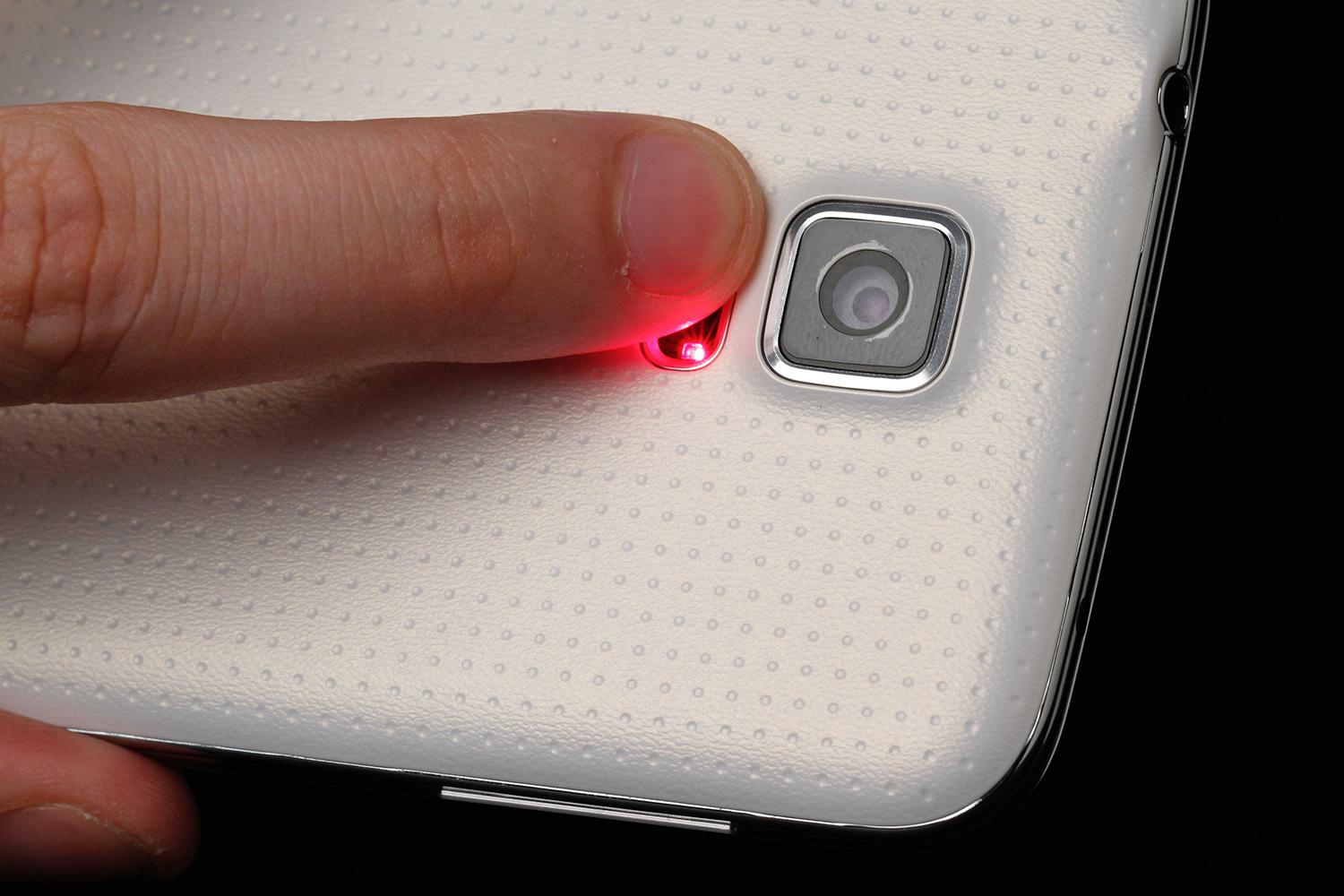
Heart-rate monitor: Not everyone will use or care about this feature, but if you want to check your heart rate after a workout, or for medical reasons, you can easily do so with the GS5. It has a small red light that shines through your finger on the back of the phone. The built-in S Health app will record your heart rate every day. The heart-rate monitor appears to work well. We haven't had any false reads, but did discover that we have a fantastic resting heart rate.

Samsung Galaxy S5 review rear light

Fingerprint scanner: Samsung's new Home button doubles as a fingerprint scanner. Yes, it's an iPhone 5S rip off, but if biometrics are going to take off, they have to be widely accepted. Samsung's fingerprint scanner works a little differently. Instead of holding your finger on the Home button, you swipe it downward, across it. This makes it more awkward to use as an unlock button.

Samsung's fingerprint scanner also has the ability to let you make FIDO payments over its system or PayPal, which is more than Apple lets you do, but it's clear that it will be a few years before fingerprint scanners become a thing you truly want. Right now, it's a nice way to unlock your phone. We haven't had a lot of difficulty unlocking our phone, but again, the Home button is very low on the device, so swiping downward on it is not a lot of fun.

A cleaner user interface

We like new bells and whistles on the outside of a phone, but we also appreciate that Samsung has cleaned up the inside, too. The Galaxy S5's user interface is simpler and cleaner than previous devices. It's easier to find features, and the Settings menu has a new gridded view that makes a lot of sense.

Some of the lesser-known features on previous phones are now buried in the menus, but if you want things like the Smart Stay feature, where your phone looks to see if your eyes are staring at the screen before going idle, they are still in the Settings menu.

The Recent Apps screen and Notification menus also look cleaner and give more space to what matters, like incoming notifications. And if you want a real simple mode, you can make the icons extra big by turning on an old-folks mode that comes with a built-in magnifier.

Since there is only 16GB of space on the phone, we're very happy that the unit we tested only had 55 apps installed on it. That's a move in the right direction from the 70 or more apps most phones had pre-installed in 2013. Samsung has kept a lot of its own apps intact, but isn't shying away from Google apps, either, with a folder full of them on the main home screen.

Overall, Samsung's new interface is classier, less cluttered, and easier to use than it was on the Galaxy S4. It's still a little busy compared to Google's lean Nexus 5, but some of the new features, like Ultra Power Saver Mode, are very useful.

Ultra Power Saving Mode is a winner

We've used Samsung's new Ultra Power Saving Mode, which will help you conserve battery life in a jam. It's the most intense battery-saving mode we've ever seen. It shuts down all services except a few vital ones, and turns the screen black and white. But according to Samsung, it can squeeze a full 24 hours out of a nearly empty battery.

Great specs, gorgeous screen

Hardcore geeks may be disappointed in the Galaxy S5's spec sheet, which breaks no new ground this year. It appears to be as powerful as top devices like the Galaxy Note 3, LG G2, and Sony Xperia Z1S, but no more so.

This is the sharpest, best-looking screen we've seen on a phone.

The Galaxy S5 has a 5.1-inch 1080 x 1920 pixel Super AMOLED screen. This is the sharpest, best-looking screen we've used on a phone. The combination of the redesigned interface based around solid colors, AMOLED deep blacks, and Full HD resolution is a winner.

Inside the phone is Android 4.4.2, a 2.5GHz quad-core Qualcomm Snapdragon 801 processor, which has improved battery life by about 40 percent, 2GB of RAM, 16GB of internal storage (10.7GB are usable), a 2.1-megapixel front camera, a 16-megapixel rear camera, a 2,800mAh battery (300mAh greater than GS4), NFC, an infrared sensor for TV control, a Micro SIM slot, and a MicroSD slot so you can expand storage by up to 128GB.

For you geeks, the GS5 got a Quadrant score of about 23,000, which is very high, but not a ton higher than the Galaxy Note 3, which broke the 20,000 mark late last year. It also performed very well in 3D Mark's Ice Storm Unlimited test with a score of 18,500.

The battery has held up well for us so far; a day of light to medium use drains it to about half.

A few negatives

We have a few random, small complaints to make, so we'll make them here.

Rear speaker: The rear speaker on the GS5 is not particularly great. Like the GS4 before it, this phone was totally outsung by the HTC One M8.

Headphone jack up top: The HTC One, iPhone 5S, and many other phones are putting the headphone jack on the bottom instead of up top. This makes it more natural to put and pull the phone in your pocket while listening to music.

No KnockOn: LG introduced the KnockOn feature that lets you double tap the screen to turn it on. We love this and were happy to see HTC implement it on the new One M8. Samsung doesn't have this feature yet, but it would be nice.

A lot of Samsung services: Samsung has backed off a little, but it is still heavily pushing its own Samsung App Store and services. If you're a bigger fan of Google's Android services, be prepared to change a few default settings to get the Google back in the GS5.

Camera does the job

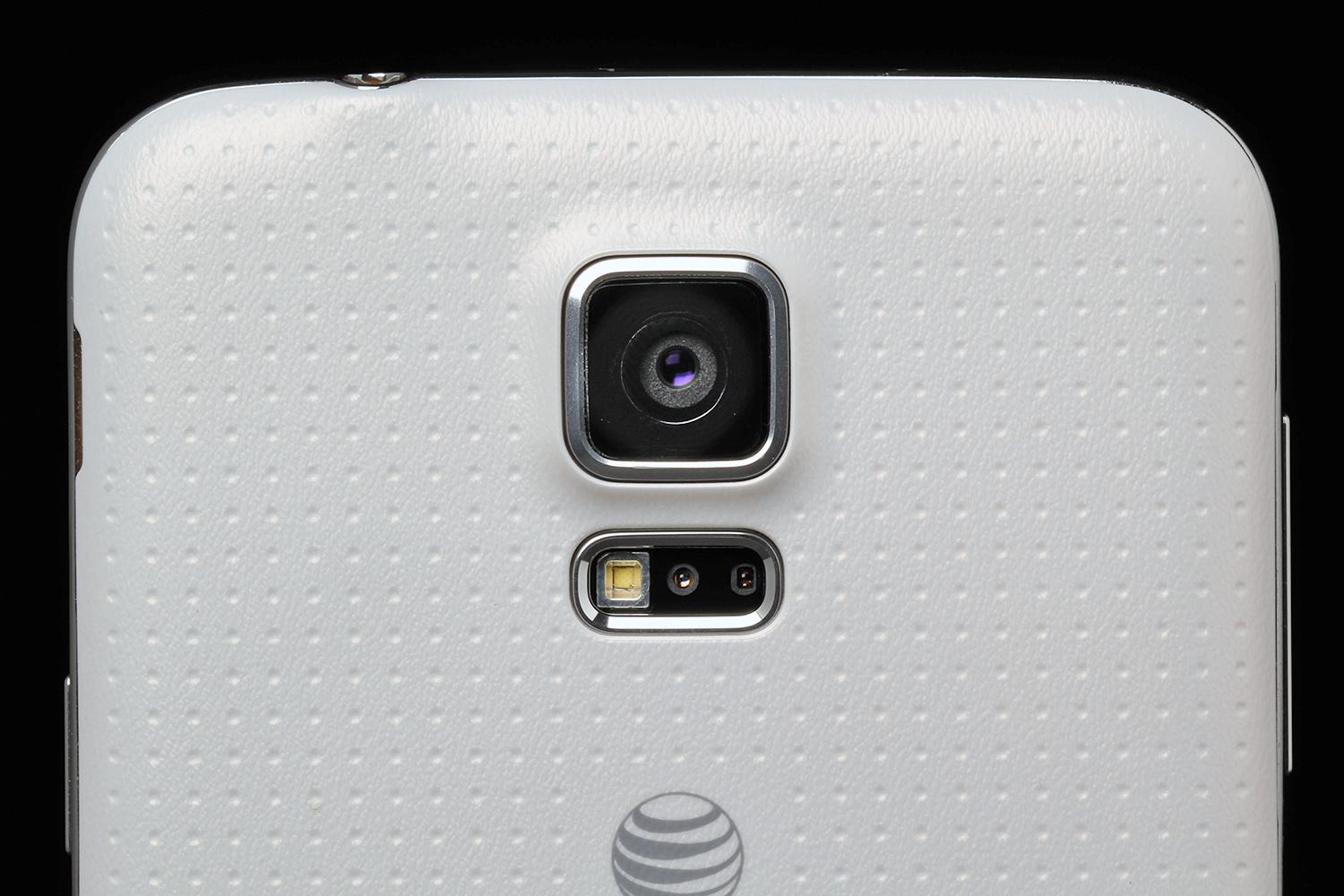
Samsung's 16-megapixel rear camera is an improvement from the GS4. It performs far better in low light, and is able to see almost as well in the dark as I can. It still doesn't outshine the iPhone 5S, but it's the best camera in a Samsung Android phone we've used yet (the Galaxy S4 Zoom doesn't count, guys).

Samsung Galaxy S5 review rear camera lens macro 2

It's not perfect. Compared to some of the advances HTC and others have made, the Galaxy S5 falls behind. Its front camera is only 2.1 megapixels, while the front cameras of many new phones have hit 5. And if you're into refocusing your pictures after you take them, the GS5 pretends that it can do this too, but it can't. Samsung just uses software and a blur effect to mimic the Lytro-like features that HTC has on a hardware level.

Calling works, nice and loud

We haven't had any reception, LTE, or talking issues on the Galaxy S5. Our test unit was on AT&T's network, which seems to be improving in the New York City area. Those we test called all reported a clear, reliable sound on the other end.

Conclusion

The Galaxy S5 is a fantastic phone. It doesn't look different, but there's a lot to love. For the first time, Samsung is innovating like Apple, instead of just mimicking it. Last year we got a bunch of new apps, and with the Galaxy Pro tablets at CES we saw a stupid new interface, but with the GS5, Samsung has taken a hard look at what people really want from its phone and tried to deliver a compelling new product that focuses its efforts on a few great features.

If you have a high-end phone from last year, there is no reason to rush out to buy the Galaxy S5, but if you're in line for an upgrade, this is the only flagship phone with a waterproof exterior on all four major carriers. T-Mobile has the Xperia Z1S, which is great, but outside of that, it's GS5 or a cheaper device. It's also the only phone with a heartbeat monitor, if that's your thing. Overall, Samsung isn't reinventing the wheel, but the Galaxy S5 is a fantastic new phone to buy and a definite contender for phone of the year.

Highs

  • Fast, powerful processor
  • Clean, redesigned interface
  • Waterproof and dustproof
  • Built-in fingerprint scanner, heart-rate monitor
  • Feels comfortable to hold
  • Competitive camera
  • MicroSD support
  • Removable battery with new Ultra Power Saver Mode

Lows

  • Stale design
  • Poor speaker quality
  • No KnockOn feature
  • Audio jack is on top of phone
  • Camera refocus is a gimmick
  • Packed with Samsung services


S Naga Malleswara Reddy

S NAGA MALLESWARA REDDY

Contact Form

Name

Email *

Message *

Powered by Blogger.
Javascript DisablePlease Enable Javascript To See All Widget